 WARN OUT
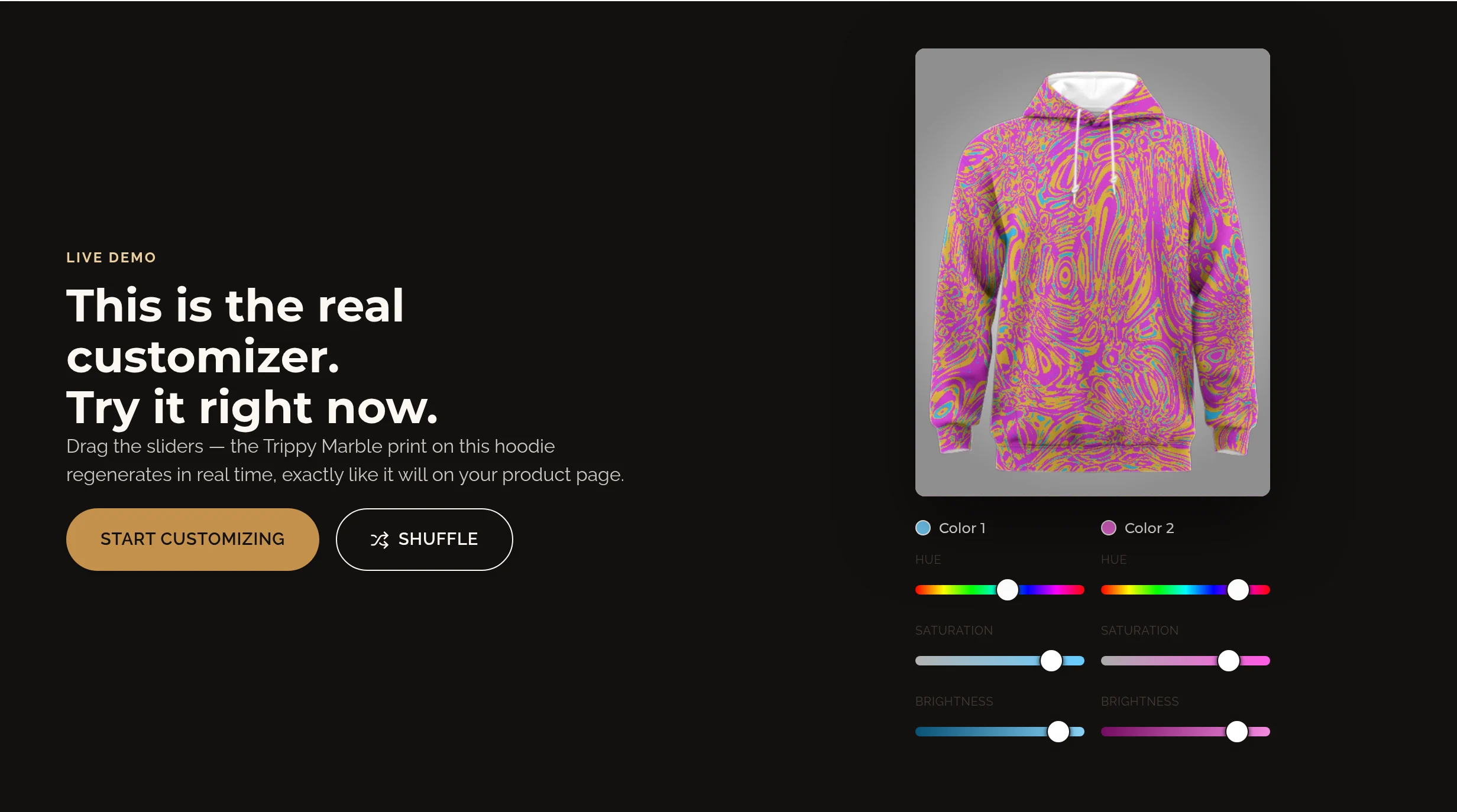
To design your own hoodie at Warn Out, choose a fleece hoodie and a design, then move the color sliders to see your print change live. Start with the Trippy Marble Fleece Hoodie: Color 1 and Color 2 each have Hue, Saturation and Brightness controls. Once you like the preview, choose your size and drawstring color, then add your one-of-one piece to your bag.
You do not need drawing skills or an artwork file. This guide walks through the actual Warn Out hoodie designer, explains what each slider changes and gives you a few color experiments to try before ordering.
What kind of custom hoodie can you design?
Custom hoodie can mean several things: adding a name, uploading a logo or creating a print. Warn Out focuses on the last option. You shape a generated design with sliders rather than uploading artwork or placing text on the chest. The hoodie shape and available sizes stay the same; you customize the artwork, not a made-to-measure fit.
Start with the Trippy Marble Fleece Hoodie for flowing, psychedelic detail, the Radial Flare Fleece Hoodie for a radiating pattern, or the Cosmic Bloom Fleece Hoodie for a different starting look. Pick the print you enjoy first, then make the colors your own.
How do you design your own hoodie step by step?
1. Choose your hoodie and starting design
Open the Trippy Marble Fleece Hoodie product page. The preview shows the print on the garment, and the design thumbnails let you try other patterns. For this walkthrough, keep Trippy Marble selected so you can follow the same six color controls shown below.
2. Set Color 1, then Color 2
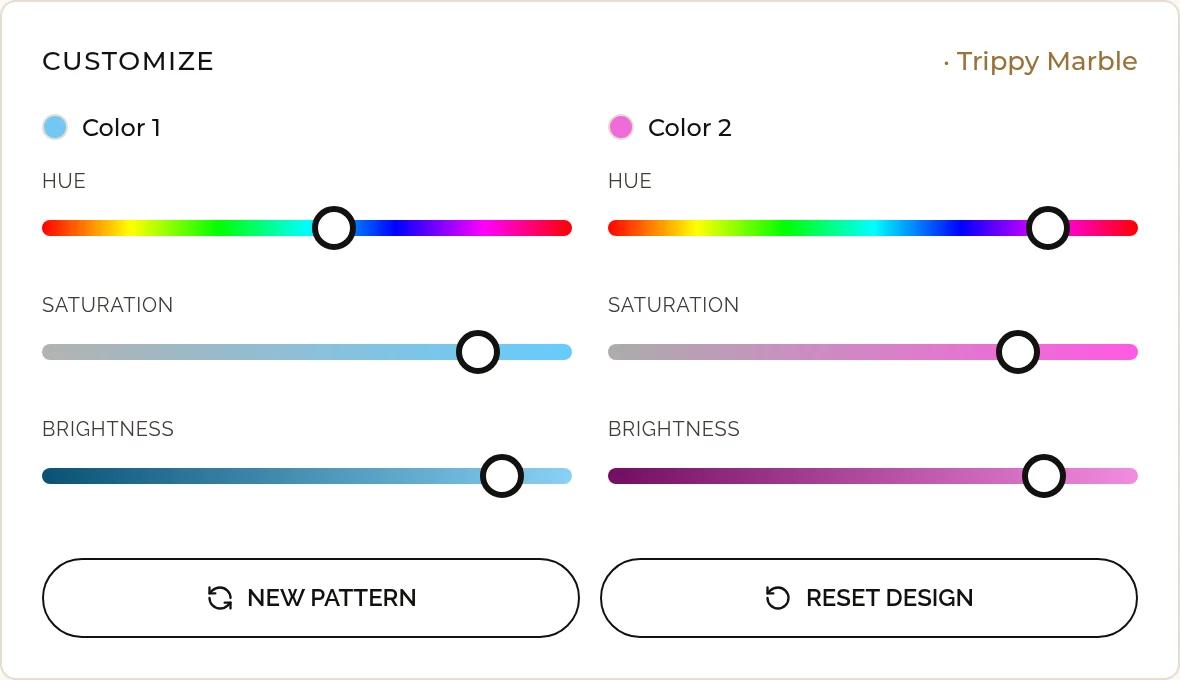
Move one slider at a time and watch the hoodie preview. Start with the Hue slider in Color 1, then adjust its Saturation and Brightness. Repeat for Color 2. Changing one setting at a time makes it easier to see which part of the look you prefer.
3. Try another arrangement or start over
On Trippy Marble, New pattern changes the pattern arrangement while retaining your color settings. The Shuffle control on the preview gives you a fresh combination of pattern and colors. Reset design restores the starting settings for the selected design. These are different actions, so use New pattern when you like your palette but want to explore the layout.
4. Check the fit and finish
Open the Size guide beside the size choices and compare its measurements before selecting a size. Choose white or black drawstrings, check the quantity and review the preview. The product description notes that design placement may vary, so treat the preview as a guide to your artwork rather than a promise of exact seam alignment.
5. Add your finished design to your bag
Choose a size before adding the hoodie to your bag. Review the design thumbnail, size, drawstring choice and quantity there before continuing to checkout. Your selected design settings are saved with the item; you do not need to prepare or upload a print file.
What do Hue, Saturation and Brightness do?
- Hue chooses the color family, such as blue, green or pink. Use it first when you want to change the overall palette.
- Saturation controls color intensity. Lower values make that color more muted; higher values make it more vivid.
- Brightness controls how light or dark that color appears. Try different brightness levels between the two colors to make the pattern easier to distinguish.
Both color groups work independently. If your hoodie looks too busy, try reducing one color’s saturation before changing everything else. If the pattern feels flat, change the brightness of one color to create more contrast. You can always reset and explore again.
What hoodie color combinations should you try?
- Bright and dark: choose a vivid first color and a darker second color. Adjust brightness until the pattern stands out in the preview.
- Soft and muted: reduce saturation in both color groups, then keep their brightness levels different so the print still has definition.
- Two favorite colors: start with colors you already wear, then adjust saturation rather than forcing both to maximum intensity.
These are experiments, not fixed colorways. Your preferred combination might be loud, subtle or somewhere between the two. Look at the full hoodie preview after each change, not just the small color swatches.
Can you design a hoodie on your phone?
Yes. Open the product page on your phone and use the same touch-friendly sliders. You can also try the live hoodie demo on the home page before opening the full product designer. The demo is a place to experiment; set your final design and choose your size on the product page.
Can you add your own logo or text?
Not in this designer. Warn Out’s customization uses generated patterns and color controls, not uploaded logos, photos or typed slogans. If you want a personal hoodie without creating an artwork file, the live print designer is the starting point.
How can you style your finished hoodie?
Let the hoodie be the statement piece with simple bottoms, or build a colorful look around it. For festival layering ideas, read how to style a men’s rave outfit. For a broader outfit plan, explore our EDC outfit ideas. Browse unisex pieces if you want to continue experimenting with other garments.
How long should you allow to receive your hoodie?
Every Warn Out piece is made to order. Allow up to 19 days to receive your order, and leave extra time before an event to check the fit and plan your outfit. Review the Shipping & returns details on the product page before checkout.
Ready to turn your favorite colors into a piece you can wear? Open the Trippy Marble Fleece Hoodie and begin with one Hue slider. You can explore the rest as you go.
Design your own hoodie